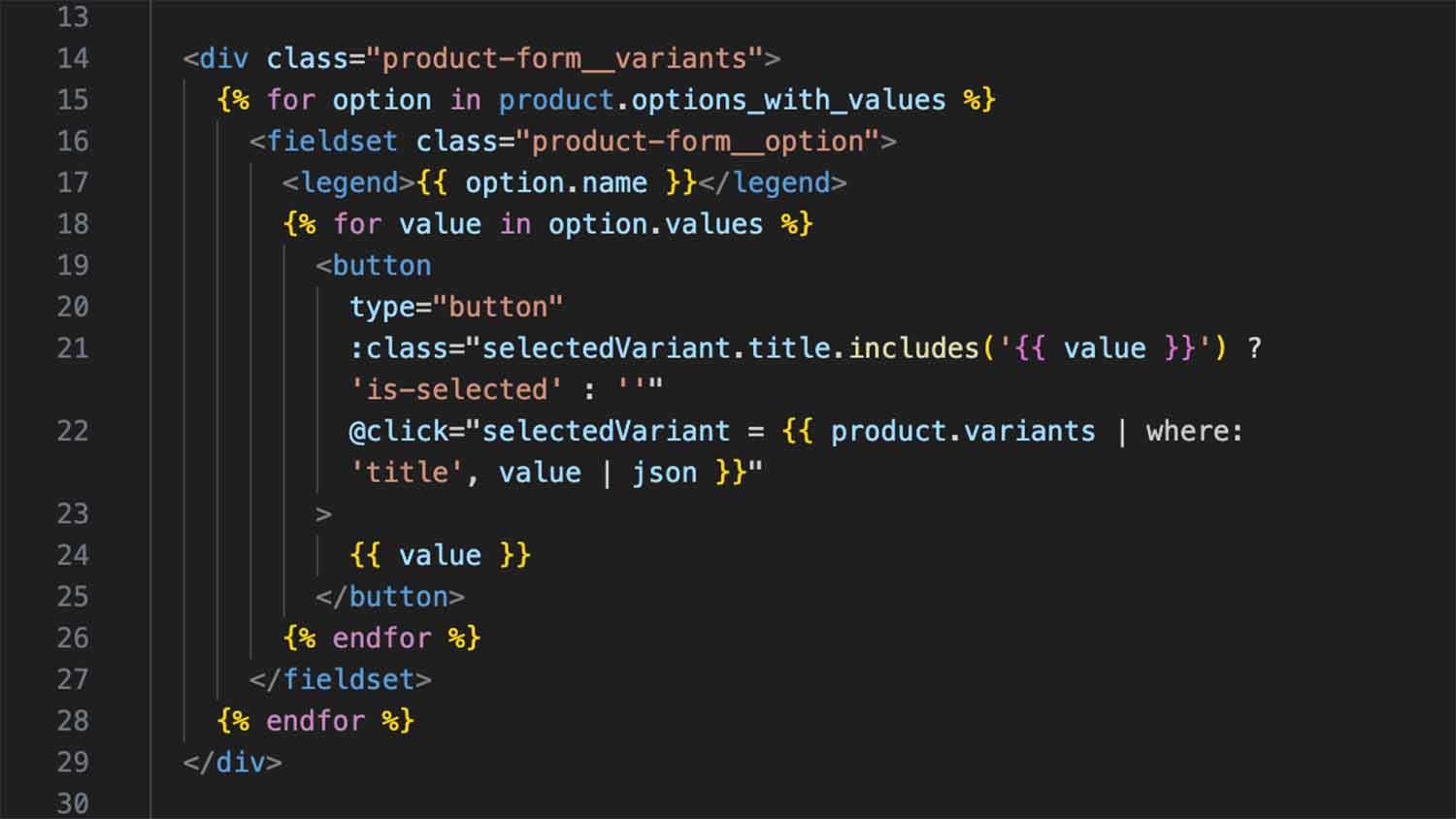
Liquid and Alpine, sitting in the same attribute, both properly highlighted.
Custom Shopify Themes Converge on Alpine.js
A Shopify theme developer requesting Liquid support for a VS Code extension is a fairly specific ask. What’s notable is that it isn’t an isolated one. Search GitHub for Shopify starter themes built in the last couple of years and Alpine.js shows up as the interactivity layer again and again, independently, across projects with no connection to each other, alongside Vite and the official Shopify CLI. It’s a genuine architectural fit, and the reason is specific.
Rundown
- Shopify’s Online Store 2.0 architecture is built on Liquid, sections, and blocks, server-rendered HTML that merchants customize through a visual editor, not a JavaScript application merchants interact with directly.
- That’s the same shape of problem Alpine.js is built for: mostly static, server-rendered markup with small, scattered pockets of interactivity, not a full client-side app.
- A real, actively maintained npm package,
vite-plugin-shopify, exists specifically to wire Vite into Shopify theme development, and multiple independent, public starter themes combine it with Alpine.js, Tailwind CSS, and the Shopify CLI. - One of those starter themes is running in actual production for a denim brand, with real features: live collection filtering with URL state, product image galleries with variant persistence, and megamenu navigation, all built on Alpine.js components.
- The request that added Liquid support to Alpine.js Tools came directly from a Shopify theme developer working in exactly this stack, not a hypothetical use case.
What Online Store 2.0 actually looks like
Shopify’s current theme architecture is built around sections and blocks: modular, server-rendered Liquid templates that a merchant can rearrange, configure, and populate through Shopify’s visual theme editor, without writing code. A theme developer builds the sections; a merchant assembles them into pages. That constraint shapes everything about how interactivity gets added afterward. The page itself is Liquid, rendered server-side and handed to the merchant’s editor as a structural unit, not a JavaScript application a developer controls end to end.
Interactivity still has to exist somewhere: a cart drawer that slides open, a collection page that filters without a full reload, a mobile menu that toggles. That interactivity has to be layered onto markup that’s already been decided by a template a merchant may rearrange, not built as a single-page app a developer owns exclusively.
Why Alpine specifically fits this shape
That’s a close structural match for the exact scope Alpine.js targets: small, scattered interactive behaviors sitting inside markup a developer doesn’t fully control or doesn’t want to convert into a component tree. Directives live directly in the Liquid attributes, x-data, x-show, @click, no separate template layer, no build step required to add a toggle to a section a merchant might later duplicate three times on the same page. A full component framework would fight this constraint: sections get rearranged, duplicated, and reconfigured by non-developers through the theme editor, which doesn’t compose cleanly with a framework that expects to own and render an entire page’s component tree itself.
Independent projects keep landing on the same stack
The npm registry backs this up directly. vite-plugin-shopify is an actively maintained package built specifically to integrate Vite’s dev server and build pipeline into Shopify theme development. It shows up as the build tool of choice across multiple independent, public starter themes: dlerm/shopify-themecraft and james0r/slayed both combine it with Alpine.js, Tailwind CSS, and the Shopify CLI as their stated stack, built by different developers with no connection to each other.
One of those starter themes isn’t just a template sitting unused. 925 Originals, a fork of the slayed starter theme, is a live production Shopify theme for a denim brand, with Alpine.js components handling real-time collection filtering with bookmarkable URL state, a product image gallery that persists custom collection images across variant switches, and megamenu navigation with what its own documentation calls “professional Alpine.js transitions.”
Where the tooling gap showed up directly
The request that added Liquid support to Alpine.js Tools came from a developer working in this stack directly, describing Alpine as “the go-to for vite-powered Shopify themes.” It’s a direct report from inside the pattern described above: real Shopify theme work hitting a real gap in editor tooling, because the VS Code extensions available for Alpine.js hadn’t extended coverage to Liquid files at all before that point.
Frequently asked questions
Does Shopify officially support or recommend Alpine.js?
No. Shopify’s own reference theme, Dawn, uses vanilla JavaScript and native Web Components rather than any framework. Alpine.js’s presence in Shopify theme development comes from independent developer choice, not an official recommendation, which is consistent with how Alpine gets adopted elsewhere: as a pragmatic fit for a specific architectural shape, not a platform default.
Would a heavier framework like React work just as well for Shopify themes?
It would work, but it fights the constraint more than it fits it. A component framework expects to own and render a page’s structure; Shopify’s sections-and-blocks model means a merchant, not the developer, decides how sections get arranged and duplicated on any given page. Attaching behavior directly to Liquid markup through directives sidesteps that mismatch in a way a full component tree doesn’t.
Is this specific to Vite, or would it work with other build tools?
The pattern predates Vite, older Shopify theme workflows used Webpack or Gulp for the same purpose, and Alpine’s directive-based approach doesn’t depend on any particular bundler. Vite has become the common choice in current starter themes because of its faster dev server and hot module reloading, not because Alpine specifically requires it.
Related reading
This connects directly to the three bugs found in Alpine.js Tools since it shipped, where Liquid support and one of the reported bugs both trace back to the same real-world usage described here, and to why Alpine.js has no real autocomplete, and why AI doesn’t fix that gap, which applies just as directly to Liquid files as it does to any other template language Alpine gets used in.